COR Management
This page covers how TomoGUI stores, resolves, and corrects center-of-rotation (COR) values across single-file and batch workflows.
Sources of COR
A COR can come from four places:
Manual — typed into the top-bar COR field or a per-row cell on the Batch tab.
Auto — TomoCuPy’s built-in auto-centre algorithm (selected via the COR method dropdown).
Try + View Try — the user scrubs the try-grid slider and picks the best slice; the associated COR is copied back.
AI Reco — DINOv2 inference writes
center_of_rotation.txtinside the try_center folder; TomoGUI reads it and populates the per-file COR.
Resolution order (batch)
Batch Try / Full use, per row:
row.cor_input                     if valid
else top_bar_cor                  if valid
else FAIL (block run, report row)
This means the top-bar Try COR acts as a fallback: you can leave it blank when every row has its own COR, or leave per-row CORs blank when the top-bar is set (typical for homogeneous batches).
Storage
Per-file CORs are written to the per-dataset parameter JSON sidecar
(next to the HDF5 file). AI Reco additionally writes
center_of_rotation.txt inside the dataset’s try_center/ folder
so the value survives across TomoGUI sessions even if the sidecar is
deleted.
Some beamlines also keep a global COR summary JSON (e.g.
rot_cen.json) that TomoGUI can read/write; this is handy for shared
access across users.
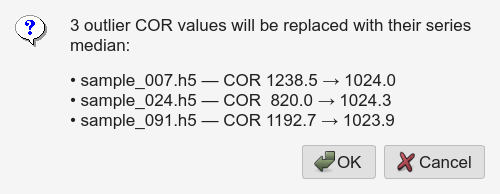
Fix COR Outliers
One click does two things for the currently-checked set of rows, using
filename-series grouping (^(.*?)[._-]*(\d+)$ on the filename stem).
Pass 1 — outlier replacement
Group rows by series.
Within each series, compute
medianandMAD.Flag any COR deviating by more than
min(max_delta, max(10, 5·MAD))from the series median.Replace each flagged COR with the average of its two nearest non-flagged neighbours by index in the same series.
max_delta is the Max COR delta spinbox (default 50 px). The
max(10, 5·MAD) lower bound prevents a very tight series from
flagging every point.
Pass 2 — missing-COR fill
Any selected row still empty after pass 1 is filled with the mean of all CORs in its series across the whole table — donors can be checked or unchecked, anywhere in the list. Series with no donors are left empty and reported.
Why series grouping?
A sliding-window approach (used in earlier versions) was awkward: a
series of 5 files and a series of 50 files need different windows.
Filename grouping is intrinsic to the naming scheme
(sample_001.h5, sample_002.h5 …) and robust to variable series
lengths.
Auto-skip undersized files
Within each series, TomoGUI compares HDF5 /exchange/data sizes. Any
file noticeably smaller than its peers is marked skipped — typically
an acquisition that was aborted partway through and did not finish
writing the expected number of projections.
Skipped files do not participate in Fix COR Outliers and are excluded from Batch Try / Full runs unless you manually re-enable them.